Hackinthus: samsung

Lava Launched Xolo X1000 In Goa Teasing "Fastest SmartPhone"


Lava Xolo X1000!!


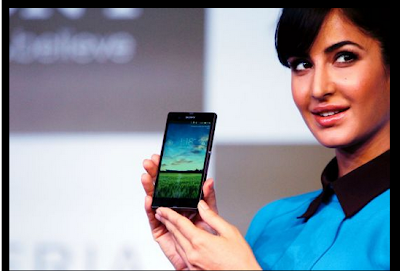
Katrina Kaif Launches Sony Xperia Z Smartphone And Tablets


Sony Xperia Z


Samsung Galaxy S4 : Event Round Up, Specs, Pricing and Availability

Samsung Galaxy S4.

Nokia Lumia 620 Review

Nokia's most affordable Windows Phone 8 device, Nokia Lumia 620

Install Instagram Unofficially On Blackberry Z10

How To Install Instagram Unofficially On Blackberry Z10 [Video] !!

Showing posts with label samsung. Show all posts

Saturday, June 08, 2013

Water And Dust Resistant Samsung Galaxy S4 Active !!

Samsung finally announced the Galaxy S4 Active on Wednesday, a new rugged version of its popular Galaxy S4 smartphone.This phone is dust and water resistant just as Sony Xperia Z(Review). It is somewhat same as Galaxy S4 and have similar features with few add on. 


                                            credit-mashable
                                        
The Active, which will run on the Android 4.2.2 (Jelly Bean), can be submerged in three feet of water for up to 30 minutes( 1 meter water for up to 30 minutes.), The Galaxy S4 Active is powered by a 1.9 GHz Quad-core processor and has 2GB of RAM. It features a 5-inch full HD (1920x1080 pixels resolution) TFT LCD screen that has a pixel density of 443 PPI.

The Active features a 1.9 GHz quad-core processor, a 2,600mAh battery. It has a 8 Megapixel back and 2MP front Camera.It has all the smart features that S4 had like AirView,Gestures,Group Play etc.The S4 Active will be available in three colors, urban grey, dive blue and orange flare, and will hit markets this summer with an initial launch in the United States and Sweden.

Via-mashable

Thursday, April 25, 2013

"Install Big Games" And Solve The Problem Of "No Memory Available" On Samsung Champ

Low end phones always have very less memory on their device and people who own these phones are not able to enjoy games that require a little bit of more space on the device so that they can enjoy games more than 500 kb .

So here is a little trick that I saw on a blog dhavalthakur which can help you to play higher end games.


Install Big Games
  • Take your Mobile and Go To your Keypad.
  • In Keypad type *#52828378# and hit Call Button.
  • A new Window of Settings will open up.
  • In that window go to the OTA Test Option and open it
  • There Choose Maximum Jar size option and change its digit to 3000 or an other big value (this means that if type 3000,then now your cellphone download size will be of till 3000kb).
After you have inserted your desired memory,Click on Save.


No Memory Available Problem 


  • Take your Mobile and Go To your Keypad.
  • In Keypad type *#52828378# and hit Call Button.
  • Then there choose Memory Test option.
  • There Change the Java Heap Value to 1760.
  • Also Change the Midlet Heap Option to 2000.
Hence You are Done!

So this is a really nice trick provided by dhaval which will help users of Samsung Champ And other low end Samsung Devices

Friday, April 12, 2013

Samsung Galaxy Mega 5.8" & 6.3" Announced


Well, Samsung recently announced Galaxy S 4 and they are back again with two new phablets - Samsung Galaxy Mega 5.8 and 6.3.
We were expecting something like this from Samsung for quite a time and it was no surprise when they officially announced these huge smartphones.
As the name suggests, Galaxy Mega will be available in two sizes - 5.8"inch & 6.3"inch.


Samsung Galaxy Mega 5.8

According to a press release, Samsung Galaxy Mega 6.3 features an HD display. The reason behind Samsung not making the device Full HD might be that they don't want people to choose this device over their flagship device, Samsung Galaxy S4.

Talking about specs, Galaxy Mega 6.3" will feature a 1.7GHz Dual-core processor running Android 4.2 and an 8 MP camera similar to Galaxy S III. The phone will also offer LTE and HSPA along with two storage options to pick from - 8 GB and 16GB.


Samsung Galaxy Mega 6.3


Coming to Galaxy Mega 5.8, it will be carrying low specs with it. Powered by a 1.4 GHz Dual-core processor, Mega 5.8 will feature a qHD (960x540) resolution display with only one storage option to pick - 8GB. The phone will offer HSPA-only and no LTE.

We have no details regarding the pricing of these two devices but they surely won't cost as big as their size.

With size of almost a tablet (7" inch), we are not sure how successful Galaxy Mega will be in this current market. But, Samsung is making sure that users are left with all possible sizes to choose from.

You can also like us on Facebook or follow us on Twitter.


About Author :
Sukesh Kumar is long time iOS user who currently shifted to Android. He is currently pursuing his Engineering in Bangalore as a computer science student. His love towards his gadgets and experimenting with it's features brought him close towards blogging and writing about technical stuffs. Read More


Friday, March 15, 2013

Samsung Galaxy S4 : Event Round Up, Specs, Pricing & Availability

The next big thing is here. Samsung is finally out with Galaxy S4, the much awaited phone of this year. Now, just sit back and scroll through this article to get a glimpse of what happened during the entire event.


Design

As predicted, the design for Samsung Galaxy S4 is inspired by it's Galaxy S III and Galaxy Note II.  The device is thinner than Galaxy S III and is a bit more rectangular like S II.

 Like other Galaxy Handsets, Galaxy S4 is also made up of polycarbonate casing, but is still the best looking Galaxy till date. Owners of S III and Note II will surely be jealous of this.

Weighing in just 130g and measuring at 69.8mm x 136.6mm x 7.9mm, Galaxy S4  is "Slimmer, lighter & Solid" than any other Galaxy.


Samsung ditched the pebble blue and Galaxy S4 is now available in two colors - “White Frost” and “Black Mist”.


Display 

Samsung Galaxy S4 features a 5-inch Full HD Super AMOLED display producing a pixel density of 441 ppi. (Wow!!) The screen smartly adjusts the screen tone to match the surroundings for lesser eye strain.


Samsung has come up a feature named Air Gesture which allow users to use gestures to change sound tracks, browse through pictures and other stuffs. Also, there is something known as Air View, that allows users to hover their finger above content to get a quick sneak preview. (Amazing!)

Hardware 

Samsung Galaxy S4 is powered by a 1.9 Ghz quad-core processor (1.6 Ghz Octa-core processor in some regions) and 2GB of LP DDR3 RAM. There are total 8 sensors on this device.
Some of the features are -
- Screen Mirroring 
- Smart Pause : Which let you pause the video when you look away from the screen.
- Smart Scroll : lets you scroll through pages simply by titling your device.


Software

Samsung Galaxy S4 runs the latest Android 4.2.2 Jelly Bean with a slightly updated TouchWiz UI.


Storage

Like previous Galaxy Handsets, S4 come with three storage options, ie, 16, 32, 64 GB. All three can be expanded using microSD card upto 64GB.

Connectivity

Galaxy S4 packs in 3G and 4G LTE models and WiFi offering  a/b/g/n/ac (HT80). With 4G LTE, one can now download with a speed of up to 100  Mbps and upload speed of 50 Mbps. 


Apart from all above, S4 includes Bluetooth 4.0, NFC & GPS.

Camera 

As rumored, Galaxy S4 features a 13 MP primary camera and a 2 MP secondary camera. Camera's Drama Shot feature is capable of snapping 100 shots every 4 seconds. Both the cameras can be used at the same time.


Samsung also introduced 'Sound and Shot', a new add-on  which allows user to record five seconds of audio before clicking a shot. As Samsung says, “it’s like adding another dimension of detail to the memory you’re creating."


Other cool features include 'Eraser', which lets you remove people in pictures who might be “interrupting” your photo.


Apart from all these, there are some standard smartphone features like HDR (High Dynamic Range) mode, panorama shot, sports mode, face detection.


Battery

Samsung Galaxy S4 is powered by a massive 2600 mAh battery which will provide users with decent amount of battery life.


Other Smart Features 

- S Translator - lets you translate different languages and it's all VOICE. (Mind Blowing!!) It responds to 9 different languages.

- Group Play - allows you to connect 8 S4 devices together with no wireless router required!!

- Adapt Display - adjusts the volume and tone to an optimum level for user's comfort.

- WatchON -   transforms your smartphone into an IR remote, through which one can control TV, set-top box, DVD player etc.


Pricing and Availability

Samsung hasn't announced official pricing for S4 yet, but indicated that it will be around same as any previous flagship device. We are expecting it to be around ₹44,500.
 
Galaxy S4 will be launching on 327 carriers in 155 countries, at the end of April 2013.


(via Redmondpie) 


You can also like us on Facebook or follow us on Twitter.


About Author :
Sukesh Kumar is long time iOS user who currently shifted to Android. He is currently pursuing his Engineering in Bangalore as a computer science student. His love towards his gadgets and experimenting with it's features brought him close towards blogging and writing about technical stuffs. Read More


Sunday, March 03, 2013

Samsung Galaxy S IV : Confirmed Features

Samsung Galaxy S IV Event is just around the corner and we all are really excited to see what Samsung has to offer this time. Meanwhile, Android Advices recently uploaded some of the confirmed features of Samsung Galaxy S IV which are quiet a catch.


       Two Camera’s work (Front and Rear) simultaneously for 360 capture. 
       

       Smart Scroll
 

       Qualcomm Processor
       

       Air View Touch
 

       Updated Gallery with new features for Grouping of Photos


Among all, odd one is the use of Qulacomm Processor in Galaxy S IV. Other than that, the 360 deg capture looks really eye-catching. What it does is it uses both the front and the back camera and takes an 360 deg image. (wow!)

The Gallery in the Samung Galaxy S IV will also be upadted with new UI and features which involoves a new method for grouping of pictures.


Smart Scroll is something which we have no idea about but its surely related to sensor which might capture your head movement and accordingly scroll the page.(Just a guess!)


Rumors are also that Samsung Galaxy S IV may feature a 'flexible display' and might be available in variety of colors rather than just two.

All our doubts will be cleared on 14th March and as usual Stay Tuned to Hackinthus as we will be covering the Entire Event.

(via - Android Advices)


You can also like us on Facebook or follow us on Twitter.


About Author :
Sukesh Kumar is long time iOS user who currently shifted to Android. He is currently pursuing his Engineering in Bangalore as a computer science student. His love towards his gadgets and experimenting with it's features brought him close towards blogging and writing about technical stuffs. Read More


Saturday, March 02, 2013

How To Install Jelly Bean 4.1.2 In Samsung Galaxy Note GT N 7000


Samsung has launched Jelly Bean Android Version 4.1.2 in various parts of world. They have a habit of rolling updates in one region and then passing over the whole world. There is nothing such as world wide release which Apple does.

Now what do other user do to get the Firmware which is released for other countries? Simply waiting for the same thing which you are about to get from your Kies or directly is useless. I am when we can assure you that nothing happens to your phone it's the same but only you have to do it manually.

So if you have Samsung Galaxy GT N 7000 and you are willing to get yourself the Jelly bean 4.1.2 update it's easy and carefully follow the instructions below.

Download the Firmware of Jelly Bean 4.1.2 from here. It links you to the website for Samsung Updates of various firmwares. Select the first one from Germany and download it. Or download it from here (Hong Kong, Taiwan) gives you the direct link.

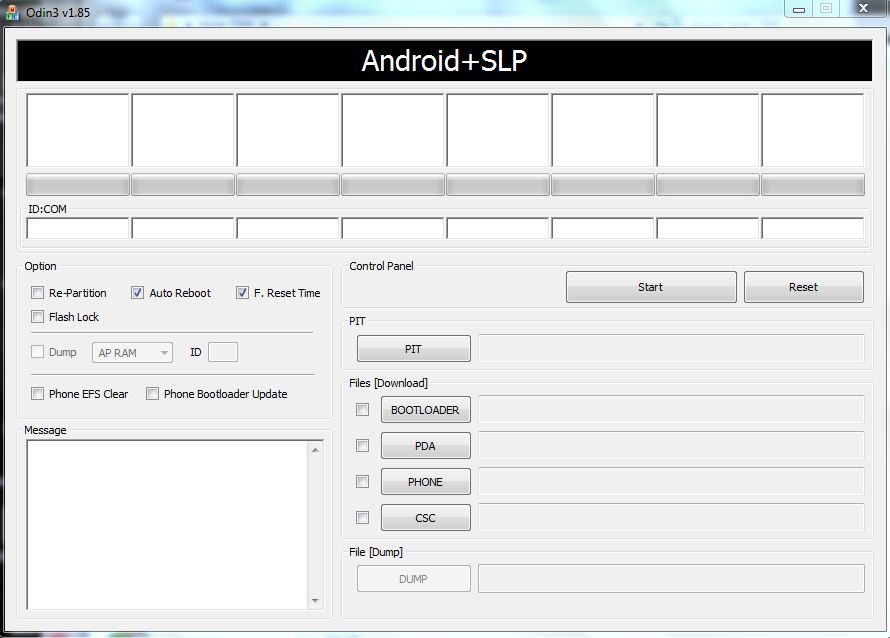
Secondly you will need Odin v1.85 and extract the file.

To go ahead with the process after you have downloaded the file make sure you have Samsung Kies installed on your PC otherwise there could be problem recognizing the drivers. 

Enable Phone's USB debugging mode from your phone's settings and make sure your phone is fully charged. It is recommended to make a proper backup of your phone's data as during any issue your phone is recovered. 

Launch Odin now and run it in Administrator mode-


Click To Zoom

Power off Galaxy Note and put it on the Download Mode. To do this, press and hold the Volume Down and Home buttons while pressing the Power button until the Samsung Galaxy logo appears on the screen.

Connect the phone in download mode with your USB connected to PC running Odin.

Now click on PDA and browse the ".md5" file you have downloaded above. Make sure the Auto Reboot and F.Reset Time is set. 


Click To Zoom
You are ready to go now, hot the start button and wait for the process to complete itself. After the process is done Samsung logo will pop up and it will take few more minutes to load. However your data wont be lost. In case you had previously rooted before installing this your root will vanish. 


Some of the key features of the Android 4.1.2 Jelly Bean update (Build JZO54K) for Samsung Galaxy Note (GT-N7000) include:

- Smooth performance and stability

- Multi-View (Multi Windows Multitasking, same as in Note 2)

- Multi-View can also be disabled

- Page Buddy

- Customizable Notification Panel

- New additions in Notification Panel

- Smart Rotation

- Samsung’s S Cloud services

- Features like Direct Call, Smart Stay and Pop-up Play

- New widgets from the Galaxy S3

- Two Home screen modes

- New Notifications bar

- Google Now

You can also like us on Facebook or follow us on Twitter.

Overall it's perfect until you overload your RAM.

Got any doubt make sure to ask us in the comment section.

Sunday, February 24, 2013

MWC'13-Samsung Unveils HomeSync Media Streamer To Compete With Apple TV.

Samsung leaves no stone unturned to compete with apple,There was recent news of Apple launching it's TV in India and here is Samsung to compete.Along with the Galaxy Note 8.0,Samsung today at MWC'13 lauched  homesyc,a media player device.


Not only it provides users to stream photos, videos, and apps from their Galaxy devices to their television at 1080p resolution,but also has a storage capacity of 1 TB. It is powered by 1.7 GHz dual-core processor and runs on Android Jelly Bean OS.The device will be available in April of this year, though there's no pricing information just yet.


Samsung HomeSync Specifications:

  • 1.7 GHz dual-core processor
  • Android Jelly Bean OS
  • 1GB DDR3 RAM, 8GB eMMC, 1TB HDD
  • Gigabit Ethernet LAN
  • WiFi 802.11a/b/g/n (802.11n 2.4GHz and 5GHz), HT40 2 x2 MIMO Channel Bonding, Bluetooth 4.0
  • External USB 2.0 x 2, micro USB, HDMI
  • DRM: HDCP 1.3/2.1, Playready, Widevide, Trustzone


You can also like us on Facebook or follow us on Twitter.

MWC'13-Samsung Galaxy Note 8.0 : What It Has To Offer?

Finally after all the rumors and leaked pictures, Samsung's new baby tablet has finally been announced. Its called the Samsung Galaxy Note 8.0. It was one of the worst-kept secrets recently and we all were expecting this device to come out soon enough.


Talking about the device, Galaxy Note 8.0 is designed fairly well and with just 338g, it feels really comfy in your hands. Samsung claims that they were inspired by the standard Moleskine notebook while designing this device.


Getting down to specs, it's powered by a 1.6Ghz quad-core Exynos processor running Android Jellybean 4.1.2 and packs in a massive 2GB of RAM. The 8 inch HD screen is quiet stunning producing 189 ppi enhanced with a feature called “Readers Mode” that automatically adjusts the screen settings while reading e-books. 


Samsung Galaxy Note 8.0 is boosted with a massive 4800 mAh battery which will easily last for more than a day with heavy usage.

The 5.0 MP camera on the Galaxy 8.0 is not as great as we were expecting but then again using a tablet as your primary camera device, not a good idea. 


Don't you think we are forgetting something?? Ya, right. When there is 'Note', there is 'S-Pen'. Note 8.0 features a “Premium Suite” of applications designed to utilize the S Pen (which includes multi-window) . And the good news is, it allows third-party developers to use S pen's hover-gestures to add new features into their very own software.(Great!!) They have also added a new remote program that acts like universal TV remote. 


Samsung Galaxy Note 8.0 will be available in two variants : 3G-enabled & WiFi Only and will be launched in the second quarter of this year.  

It will interesting to see how tough it proves out to be in front of iPad mini and Nexus 7.

(via Yahoo)   

You can also like us on Facebook or follow us on Twitter.


About Author :
Sukesh Kumar is long time iOS user who currently shifted to Android. He is currently pursuing his Engineering in Bangalore as a computer science student. His love towards his gadgets and experimenting with it's features brought him close towards blogging and writing about technical stuffs. Read More


Tuesday, February 19, 2013

Jelly Bean Update for Samsung Galaxy Note !!

Samsung has started rolling out Android 4.1.2 Jelly Bean for it's first Phablets device Note GT-N7000. Note was one of the successful Phablets of Samsung and it always keeps updating this device as it has a large user base.The update is now rolling out slowly to all regions, and is available via Samsung KIES, Samsung's desktop phone management software or over the air.


This update might not be available instantly as it is slowly rolling out to every country and you might have to wait for a little while.After this update I think there will be very little difference between Note and Note2. 
,
This update includes(via-sammobile)


  • Android 4.1.2 – Build JZO54K
  •  Buttery Smooth Performance & Great Stability (Thanks to Project Butter)
  •  Multi-View (Multi Windows Multitasking, same as in Note II)
  •  Multi-View can also be disabled
  • Page Buddy
  • Notification Panel can now be customized
  •  New Additions in Notification Panel
  • Smart Rotation (Screen Display adjusts to your angle of sightings)
  • Continues Input in Samsung Keyboard (Like Swipe or Android 4.2 Keyboard)
  • Samsung’s Cloud services
  • Features like Direct Call, Smart Stay and Pop-up Play
  • New Widgets From the Galaxy S III
  • 2 Home screen modes
  • New Notifications bar
  •  Google Now


Via-Ndtv


You can also like us on Facebook or follow us on Twitter.

Wednesday, February 06, 2013

Samsung Galaxy Grand Review

Samsung Galaxy Grand is an attempt to provide users with a feel of top-end devices, such as Galaxy S III & Note II, at a very affordable price and decent specs. With Micromax launching it's very first Quad-core smartphone A116 Canvas HD for just  ₹15,500 (Apprx.), users now have a bunch of android phones to choose in the mid-range budget and they usually prefer brands like Micromax, Karbonn and Xolo over Samsung's Galaxy Ace Plus and HTC's Desire series. To overcome this to a limit, Samsung released Galaxy Grand, a mid-range budget smartphone priced at ₹21500. 


Screen

Samsung Galaxy Grand comes with a massive 5'inch WVGA with resolution of 480 x 800 pixels with  a pixel density of 187ppi which is quiet decent but a HD screen would have made it a killer deal. Now, at a much lesser price Micromax is providing customers with a 720p IPS display with a pixel density of 294ppi.


Processor & Memory

Galaxy Grand is powered by 1.2GHz Dual-Core Broadcom processor (not Exynos). It comes with a built-in 8 GB internal memory (which is twice compared to Micromax Canvas HD A116) and expandable upto 64GB (32GB in Canvas HD A116).


Software

Galaxy Grand runs on Android 4.1.2 Jelly Bean with Samsung's Touchwiz UI and includes almost all the demanding features from it's big brothers like Smart Stay, Pop up Play and Direct Call. 

Connectivity 

Galaxy Grand also becomes the very first phablet to include the dual-SIM facilty in the mid-range zone with Quad-band 2G supported by both the SIM slots, whereas 3G connectivity is supported only by SIM1 slot. Weighing in at just 162g , Galaxy Grand is 20g lighter than the Galaxy Note II and is one of the few phones in its segment to feature a dual-band Wi-Fi ‘n' which provides users with much faster connectivity.


Camera

Galaxy Grand packs in a 8 MP camera with LED flash and digital image stabilization which helps you take decent shots in low light. Resolution is similar to that of Galaxy Note II. Videos on Galaxy Grand can be recorded at 1080p at 30fps.


Battery

Last but not the least, Samsung Galaxy Grand comes with 2100 Li-ion mAh battery which  provide users with quiet a decent amount of talk time in addition to other activities such as media,browsing, gaming, etc.

Conclusion

Samsung Galaxy Grand seems to be a very good investment for those who wishes for S III and Note II but can't really afford it. Not only that, it also provide users with features which most of the smartphones don't in that particular price range. 

Thumbs up for Galaxy Grand!!

You can also like us on Facebook or follow us on Twitter. 


                                              Buy From Flipkart !!


Sunday, February 03, 2013

10 Must Have Apps For Your Android SmartPhone


We aren't well acquainted with all the App which is available in Play Store. It's a natural tendency for us to keep looking for apps that may sound interesting. Play Store promote new apps so does do technology magazines. Rest we may hear from various website or blogs. Small developers sometimes do excellent job but they are not well promoted, that's what our job is here. 

Today i made a list of few famous Apps that you must have on your Android Phone, most probably i wrote this article for Galaxy Note II but it will work on other android phones as well.
Check your compatibility in the play store link and if it's fine to go do install and try out.

1.Power Toggles:


If you need to toggle to many of your phones main features then go ahead and install this app. Will provide a new set of toggle options to control your phone. 
Get it here.


2.PicSay Photo Editor:


Need to say within the pictures this app is right for you. Customize your photos to various extent such as adding cartoonistic text boxes and pre defined images. The pro version is also available.
Get it here.

3.Super SU:


Super SU is the Superuser access management tool of the future. If you are rooted you must have this.
Get it here.

4.AirDroid:

Tired with painful Samsung Kies bug, this is the best app you can get for wirelessly transferring anything from your desktop to your phone or vice-versa. One thing is important that you must be connected over the same modem otherwise you can't transfer. This app is having a smooth UI and have no certain bug. Also includes feature like installing an app directly from your pc to your mobile.
Get it here.

5.MX Player:


This is the best app for watching video on your smartphone. We always struck with various videos format and that's why we need to change it to some desired supported format before transferring it to our phone. That limitation is lifted here by this MX Player as it can play multiple format videos. Not only these there are few other cool things as you can pinch and zoom and swipe around subtitle.
Get it here.

6.Tasker:


The best app of its kind. It does almost anything. Do test yourself to find about this app but sorry this app ain't free.
Get it here.

7.PIC Speed HD Wallpaper:


Bored of your phone home screen and want to customize it with HD wallpapers this is the thing. This app provides over 170,000 HD wallpapers of all different genres.
Get it here.

8.QuickPic:


If you are bored with your default phone gallery try this out. This is just an alternative to browse your phone's pictures.
Get it here.

9.AdAway:


Must note this app requires root permission as there aren't any good app that can block all the in apps advertisement without root.
Get it here.

10.AfterFocus:


Bring DSLR-like Photography to your Smartphone. I am sure you must have heard about Instagram but this one is like a pro thing to your photography editing tool. 
Get it here.

You can also like us on Facebook or follow us on Twitter.

Share

Twitter Delicious Facebook Digg Stumbleupon Favorites More