




Samsung has launched Jelly Bean Android Version 4.1.2 in various parts of world. They have a habit of rolling updates in one region and then passing over the whole world. There is nothing such as world wide release which Apple does.
Now what do other user do to get the Firmware which is released for other countries? Simply waiting for the same thing which you are about to get from your Kies or directly is useless. I am when we can assure you that nothing happens to your phone it's the same but only you have to do it manually.
So if you have Samsung Galaxy GT N 7000 and you are willing to get yourself the Jelly bean 4.1.2 update it's easy and carefully follow the instructions below.
Download the Firmware of Jelly Bean 4.1.2 from here. It links you to the website for Samsung Updates of various firmwares. Select the first one from Germany and download it. Or download it from here (Hong Kong, Taiwan) gives you the direct link.
Secondly you will need Odin v1.85 and extract the file.
To go ahead with the process after you have downloaded the file make sure you have Samsung Kies installed on your PC otherwise there could be problem recognizing the drivers.
Enable Phone's USB debugging mode from your phone's settings and make sure your phone is fully charged. It is recommended to make a proper backup of your phone's data as during any issue your phone is recovered.
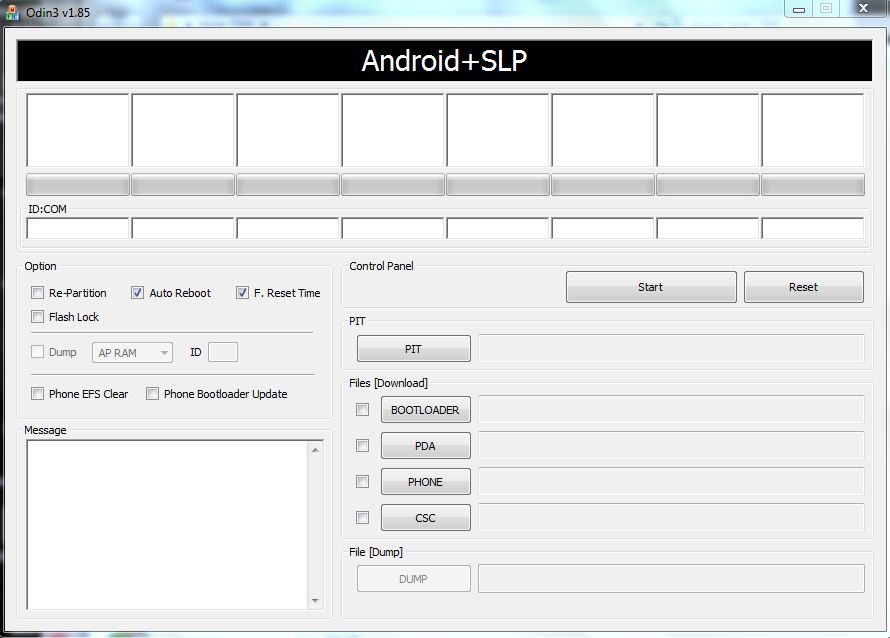
Launch Odin now and run it in Administrator mode-
 |
| Click To Zoom |
Power off Galaxy Note and put it on the Download Mode. To do this, press and hold the Volume Down and Home buttons while pressing the Power button until the Samsung Galaxy logo appears on the screen.
Connect the phone in download mode with your USB connected to PC running Odin.
Now click on PDA and browse the ".md5" file you have downloaded above. Make sure the Auto Reboot and F.Reset Time is set.
 |
| Click To Zoom |
Some of the key features of the Android 4.1.2 Jelly Bean update (Build JZO54K) for Samsung Galaxy Note (GT-N7000) include:
- Smooth performance and stability
- Multi-View (Multi Windows Multitasking, same as in Note 2)
- Multi-View can also be disabled
- Page Buddy
- Customizable Notification Panel
- New additions in Notification Panel
- Smart Rotation
- Samsung’s S Cloud services
- Features like Direct Call, Smart Stay and Pop-up Play
- New widgets from the Galaxy S3
- Two Home screen modes
- New Notifications bar
- Google Now
You can also like us on Facebook or follow us on Twitter.
Overall it's perfect until you overload your RAM.
Got any doubt make sure to ask us in the comment section.


