Hackinthus

Lava Launched Xolo X1000 In Goa Teasing "Fastest SmartPhone"


Lava Xolo X1000!!


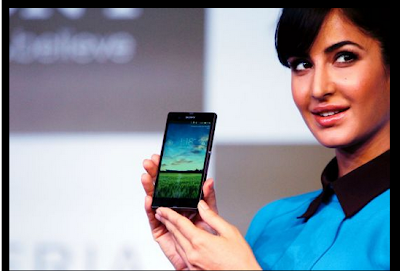
Katrina Kaif Launches Sony Xperia Z Smartphone And Tablets


Sony Xperia Z


Samsung Galaxy S4 : Event Round Up, Specs, Pricing and Availability

Samsung Galaxy S4.

Nokia Lumia 620 Review

Nokia's most affordable Windows Phone 8 device, Nokia Lumia 620

Install Instagram Unofficially On Blackberry Z10

How To Install Instagram Unofficially On Blackberry Z10 [Video] !!

Wednesday, June 05, 2013

WhatsApp For iPad Available To Download Using WhatsPad (Jailbreak Tweak)

iPad is an amazing device but sometimes it lacks some of the cooler stuffs that iPhone or other Android device have. Whatsapp is something which is popular and has replaced the SMS due to it's fast functionality. But unfortunately Whatsapp is not available on iPad yet. 


Still it's not difficult to get it on your iPad if your iPad is jailbroken and if you haven't done it yet follow http://evasi0n.com/.

You need a Jailbroken iPad before proceeding.

First download the Whatsapp on your iPad. You can't directly install if from the App Store as there is no Whatsapp for iPad available yet. There are different method to install it, one of my favorite method is to use  vShare. vShare is an installous alternative and is widely used after installous was shut down. Or use any such app like alternative to vShare where you can browse app and install directly on your iPad without using iTunes. It's even easy to install through cydia.


It's also not even necessary to have wifi+3G iPad as it works also on iPad with wifi version also. 

After you have installed Whatsapp on your iPad and it appears on your Springboard it won't work right away.

Install WhatsPad tweak from the BigBoss repository through cydia.

After installation your Springboard will restart.


You are ready to use it after installing the Whatspad tweak. It works similar to as in iPhone.


You can like us in Facebook or follow us on Twitter.

Please feel free to write your comments in the section below.

Tuesday, June 04, 2013

Leaked Images of "Low Cost iPhone" surfaces online

We are always looking for things cheaper and affordable,especially in India.As WWDC is coming closer new leaks are always being surfaced online.We had already reported about this long time before and what benefits or loss that company can suffer on my previous post .


Apple's rumored less-expensive smartphone would look much like iPhone 5, but would be built from more affordable polycarbonate plastic instead of the slick anodized aluminum of the iPhone 5. It would also likely sport the aging guts of an iPhone 4S, much like the iPad mini uses spare parts from the iPad 2.


Two users of Chinese blogging website Weibo have posted images that are said to be of the alleged cheaper iPhone.It will also be available in different colors like navy, gold orange, white, pink and green and would cost around $300-400.


You can also like us on Facebook or follow us on Twitter.


Via-TOI

Thursday, May 16, 2013

Apple Hits More Than 50 Billion Downloads

Apple's App store has hit 50 billion downloads after launching in July of 2008, As tradition, the company celebrates the milestone with multiple prizes, including a $10,000 gift card awarded to the customer who downloaded the 50 billionth and 50 more $500 gift cards to the next few individuals.


Apple on their website said "Thanks" to all their customers and further said that "It couldn't have happened without you".The countdown to 50 billion ticker first launched on May 2, and was followed by a featured promotion on the company's homepage. If we compare it with Google,It had its own milestone to announce: 48 billion downloads announced onstage at I/O today.

Apple has revealed that the 50 billionth app downloaded was Say the Same Thing by Space Inch, LLC, and the winner of the $10,000 App Store gift card for downloading it is Brandon Ashmore from Mentor, Ohio.

Via-theverge

You can also like us on Facebook or follow us on Twitter.

Thursday, April 25, 2013

"Install Big Games" And Solve The Problem Of "No Memory Available" On Samsung Champ

Low end phones always have very less memory on their device and people who own these phones are not able to enjoy games that require a little bit of more space on the device so that they can enjoy games more than 500 kb .

So here is a little trick that I saw on a blog dhavalthakur which can help you to play higher end games.


Install Big Games
  • Take your Mobile and Go To your Keypad.
  • In Keypad type *#52828378# and hit Call Button.
  • A new Window of Settings will open up.
  • In that window go to the OTA Test Option and open it
  • There Choose Maximum Jar size option and change its digit to 3000 or an other big value (this means that if type 3000,then now your cellphone download size will be of till 3000kb).
After you have inserted your desired memory,Click on Save.


No Memory Available Problem 


  • Take your Mobile and Go To your Keypad.
  • In Keypad type *#52828378# and hit Call Button.
  • Then there choose Memory Test option.
  • There Change the Java Heap Value to 1760.
  • Also Change the Midlet Heap Option to 2000.
Hence You are Done!

So this is a really nice trick provided by dhaval which will help users of Samsung Champ And other low end Samsung Devices

Saturday, April 20, 2013

Access Device's And Computer's Data On A WiFi Network By Your Android Device

Connectivity in present day devices plays a major role, major companies are running research for either new connectivity options or refining the existing options. People use WiFi to be connected to internet wirelessly in a area. If you are connected to a network you can access the data on the other devices connected to the same network by a software.


Procedure to access other devices on WiFi via Astro File Manager :-
  • Open the Astro File Manager User Interface.


  •  Then click on 'Scan Local Network' 


  •  'Work Group' icon will be displayed as shown in the Screen shot above


  •  When you click on the 'Work Group' the devices connected to the network will be displayed

  • Select the device you want to access, if it asks for password then enter the username and password of the system and then you can access it.

Astro file manager is an excellent file manager for android devices, it can be used to access your phones files as well as data on other devices connected to the same WiFi network wirelessly. This software is freely available on Google Play Store so you can easily download it and use it.  

Friday, April 12, 2013

Samsung Galaxy Mega 5.8" & 6.3" Announced


Well, Samsung recently announced Galaxy S 4 and they are back again with two new phablets - Samsung Galaxy Mega 5.8 and 6.3.
We were expecting something like this from Samsung for quite a time and it was no surprise when they officially announced these huge smartphones.
As the name suggests, Galaxy Mega will be available in two sizes - 5.8"inch & 6.3"inch.


Samsung Galaxy Mega 5.8

According to a press release, Samsung Galaxy Mega 6.3 features an HD display. The reason behind Samsung not making the device Full HD might be that they don't want people to choose this device over their flagship device, Samsung Galaxy S4.

Talking about specs, Galaxy Mega 6.3" will feature a 1.7GHz Dual-core processor running Android 4.2 and an 8 MP camera similar to Galaxy S III. The phone will also offer LTE and HSPA along with two storage options to pick from - 8 GB and 16GB.


Samsung Galaxy Mega 6.3


Coming to Galaxy Mega 5.8, it will be carrying low specs with it. Powered by a 1.4 GHz Dual-core processor, Mega 5.8 will feature a qHD (960x540) resolution display with only one storage option to pick - 8GB. The phone will offer HSPA-only and no LTE.

We have no details regarding the pricing of these two devices but they surely won't cost as big as their size.

With size of almost a tablet (7" inch), we are not sure how successful Galaxy Mega will be in this current market. But, Samsung is making sure that users are left with all possible sizes to choose from.

You can also like us on Facebook or follow us on Twitter.


About Author :
Sukesh Kumar is long time iOS user who currently shifted to Android. He is currently pursuing his Engineering in Bangalore as a computer science student. His love towards his gadgets and experimenting with it's features brought him close towards blogging and writing about technical stuffs. Read More


A Tool To Manage Your Digital Afterlife "Inactive Account Manager"

Did you ever think what would happen to all your files,folder,photos and other digital stuff after you die.What would happen  to your Gmail account, Google Drive documents, Picasa photos, and the other data you have stored with Google ? No right,But there is someone thinking about it and who else would it be except Google.

Google today launched a tool known as "Inactive Account Manager".Google on their blog said "Not a great name, we know — and you’ll find it on your Google Account settings page. You can tell us what to do with your Gmail messages and data from several other Google services if your account becomes inactive for any reason."


An "Inactive Account Manager" can be used to direct Google to pass on data from online venues such as Google Drive, Gmail, YouTube, or social network Google+ to particular people, or be deleted after being dormant for too long.

If you are facing problem on howto do it or setup your Inactive account manager CNET has explained it quite well on their website,Please have a look at it if you need help.

I think soon Facebook,Twitter and other social websites will take this thing seriously and plan an Afterlife of Digital media.


You can also like us on Facebook or follow us on Twitter.

Share

Twitter Delicious Facebook Digg Stumbleupon Favorites More