Hackinthus

Lava Launched Xolo X1000 In Goa Teasing "Fastest SmartPhone"


Lava Xolo X1000!!


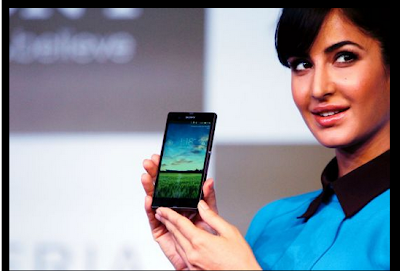
Katrina Kaif Launches Sony Xperia Z Smartphone And Tablets


Sony Xperia Z


Samsung Galaxy S4 : Event Round Up, Specs, Pricing and Availability

Samsung Galaxy S4.

Nokia Lumia 620 Review

Nokia's most affordable Windows Phone 8 device, Nokia Lumia 620

Install Instagram Unofficially On Blackberry Z10

How To Install Instagram Unofficially On Blackberry Z10 [Video] !!

Tuesday, February 19, 2013

How To Make WhatsApp Free For Lifetime

"WhatsApp", A revolutionary messaging application  which completely eliminated the so called term 'SMS'. Now, people usually refer to the phrase "WhatsApp me" instead of "message me". Now, the problem with WhatsApp is that you have to pay 0.99$ on iOS to get it but once you purchase it, it's free for lifetime. Whereas, on Android and other platforms it's free for 1 year after which you have to pay 0.99$ every year to use it. Quiet disappointing. But there's always a way to get things for free and same goes for Whatsapp too. Today, I am gonna tell you how to make WhatsApp's subscription free for lifetime.


All you need is, 
  • Apple Account 
  • Patience 
  • iPhone (temporary)
Lets begin.
Starting of with 'Apple Account', you need to create one. Just download and install 'itunes' and from there you can easily create your Apple account.

Next comes 'Patience'. It's quiet a tradition on iOS where they giveaway various apps for free of cost. So, every year there's a period when 'Whatsapp' is completely free on iOS, i.e, lifetime subscription. 
So have patience and wait for that period to come. Don't worry, stay tuned to Hackinthus and we will let you know.

Finally, you need an 'iPhone' which you can easily borrow from one of your friends. Once you have downloaded WhatsApp from App store for free from your account, install it on your friend's iPhone with your own SIM card in it.(Don't Forget to first Log Out from his Apple account and then Log In via yours).
After installing, just enter the required data and done!!(Just for Safety message few of your buddies using iPhone and then log out from your Whatsapp's account).

Take out the SIM card and put it back into your Android phone, install WhatsApp in it via the usual procedure and then go to Settings -> Account -> Payment and you shall be greeted with this screen.


Now, I am not sure about this trick working on every single device or platform. But incase you are having any sort of problem, feel free to comment below so that we can help you out.

You can also like us on Facebook or follow us on Twitter.


Jelly Bean Update for Samsung Galaxy Note !!

Samsung has started rolling out Android 4.1.2 Jelly Bean for it's first Phablets device Note GT-N7000. Note was one of the successful Phablets of Samsung and it always keeps updating this device as it has a large user base.The update is now rolling out slowly to all regions, and is available via Samsung KIES, Samsung's desktop phone management software or over the air.


This update might not be available instantly as it is slowly rolling out to every country and you might have to wait for a little while.After this update I think there will be very little difference between Note and Note2. 
,
This update includes(via-sammobile)


  • Android 4.1.2 – Build JZO54K
  •  Buttery Smooth Performance & Great Stability (Thanks to Project Butter)
  •  Multi-View (Multi Windows Multitasking, same as in Note II)
  •  Multi-View can also be disabled
  • Page Buddy
  • Notification Panel can now be customized
  •  New Additions in Notification Panel
  • Smart Rotation (Screen Display adjusts to your angle of sightings)
  • Continues Input in Samsung Keyboard (Like Swipe or Android 4.2 Keyboard)
  • Samsung’s Cloud services
  • Features like Direct Call, Smart Stay and Pop-up Play
  • New Widgets From the Galaxy S III
  • 2 Home screen modes
  • New Notifications bar
  •  Google Now


Via-Ndtv


You can also like us on Facebook or follow us on Twitter.

Sunday, February 17, 2013

Vire Launcher For Android Completely Transform Your UI Into A Better Look


There are pretty lot of Launcher available in the Android Market for free which provides customization to it's best, replacing your phone custom launcher and giving it a whole new UI.


Some of the successful launcher for Android Smartphones includes ADW, Apex which was smooth and much accepted and downloaded by users world-wide. There's something new this time from Xda-Forum member navdeepsangwan and winograd as they have created Vire Launcher for Android. Just like other launcher this too have great features and is very smooth so whatever hardware you are on you wont feel any problem using this launcher.


Some of the features includes 3D Transition Animations, Automatically Themed Icons, Reflection Effects & Multi-Touch Controls.


Currently this package is in beta mode and the author has issued this for free in Play-Store so that he can get feedback about this app.


The 3D home effect that HTC tried to implement in Sense 3.5 is one of the awesome feature the package contains and also by using on board accelerometer users can see lots of visual changes on the UI. 


The entire UI is amazingly customizable so one should try this app on their phone with just minimum requirement of Android 2.2 and up. 

(Download Link- Play Store)

You can also like us on Facebook or follow us on Twitter.

Source: Xda-Developers

Friday, February 15, 2013

Floating Note And Floating Paint, New Application For Multitasking

Multitasking is the new trend that is governing the present mobile phone market, after Samsung Galaxy Note 2 launched this exciting feature. But as this feature is present only in selected phones, developers have been developing several applications to enable multitasking feature in Android device. Floating applications such as Floating Stickies and Floating Draw have been recently developed which simplify multitasking feature by allowing applications to float or hover over other running applications, this allows users to more easily perform multiple actions at once. Floating Notes and Floating Paint are the newly developed applications  which are, to jot down notes and to illustrate over another application, respectively.
Floating Notes is present in up to two resizable and minimizable notepads . Transparency can be adjusted and notes can be saved, shared, copied, and pasted.
This application can be downloaded from the Google Play Store.


Floating Paint application allows up to four resizable and minimizable windows to doodle on. A pane slides out from the right of a window of the device to allow users to set the window transparency, color of the paint, and the thickness of the paintbrush.
Photo Credits - XDA Developers
Source- XDA Developers

Google Play Music Bug

Everyone believe that music player experience can always be enhanced. Some people prefer it to be really simple while some want it to be completely customizable. Nearly every Android user uses a third party Music Player app, like Winamp or Real Player, which provide them with not only a very interactive UI but also various options to enhance their music experience.

Google too released their very own Music Player know as 'Google Play Music'. Now, Play Music is a very simple and attractive music player build for those who want to keep things simple and at the same time provide some amount of add-ons to enhance your listening experience.


Now, I have been using Samsung Galaxy Note II for more than a month and been experiencing this annoying bug on Google Music Player. I am not sure about this bug being only with my Note II or every android user out there.
Everything seems to be working fine until I change it's orientation to Landscape. The Album Art along with Music Title completely disappears. Even if I change it back to Portrait, it remains the same. I badly want Google to fix this issue as its very annoying.


Please do comment and let me know if you are experiencing it too.

You can also like us on Facebook or follow us on Twitter. 
  

Thursday, February 14, 2013

Bug in iOS 6.1 Allows Anyone To Pass Through Your iPhone's Lock Screen

Apple's recent update to iOS 6.1 has already been accused of quiet a lot of things, such as connectivity issues, and looks like the list is gonna get longer as one more bug has been found which allows any individual to pass the 'passcode lockscreen' on iPhone and edit information stored in contacts. (Ouch!!)


This new bug has been discovered by a user(S1riOS6) and he has described it in his video he posted on YouTube (Check it out below).

Wednesday, February 13, 2013

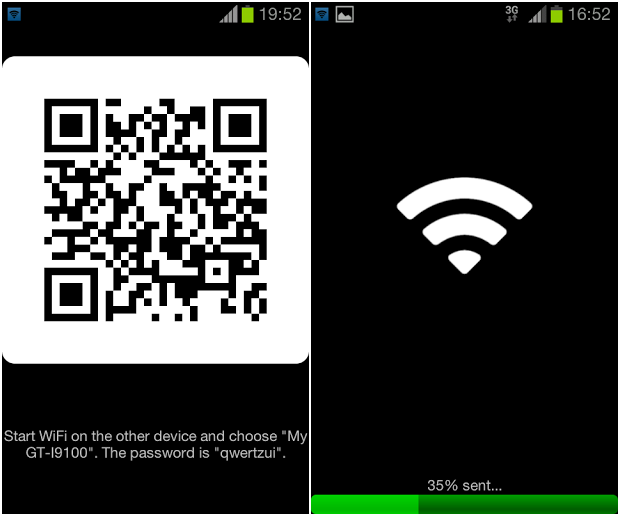
Fast File Transfer A Better Alternative To Wi-Fi Direct For Android


You must have heard of Wi-Fi direct which is simply a feature which allows you to transfer files between two devices using the phone personal WI-Fi hotspot. Nexus, Xperia and Galaxy families have pre-installed Wi-Fi Direct software. 


The best part about this app is it's speed which promises up-to 32 MBit/s and if you are good at mathematics you can sense that it can transfer 1 Gigabyte in 5 minutes. 


Features Includes:


  1. Up to 20x speed of Bluetooth  
  2. The receiver is device-independent
  3. No need for a common Wi-Fi connection
  4. No data usage for file transfers
  5. The receiver does not have to have the app installed
  6. Send single or multiple files
  7. Easy to setup:
  8. Use QR codes to allow the receiver to easily connect to the WiFi and open the receiving URL
Past days we used to depend on Bluetooth for file transfer but as technology have improved over time the WI-Fi has taken over these jobs. The personal hotspot created during the session also lets you to save your local home router bandwidth.


Download Link: Fast File Transfer

Share

Twitter Delicious Facebook Digg Stumbleupon Favorites More