Hackinthus

Lava Launched Xolo X1000 In Goa Teasing "Fastest SmartPhone"


Lava Xolo X1000!!


Katrina Kaif Launches Sony Xperia Z Smartphone And Tablets


Sony Xperia Z


Samsung Galaxy S4 : Event Round Up, Specs, Pricing and Availability

Samsung Galaxy S4.

Nokia Lumia 620 Review

Nokia's most affordable Windows Phone 8 device, Nokia Lumia 620

Install Instagram Unofficially On Blackberry Z10

How To Install Instagram Unofficially On Blackberry Z10 [Video] !!

Thursday, March 14, 2013

Nokia Lumia 620 Review

The most awaited Windows Phone 8 finally launched in India, Nokia Lumia 620. This phone brings all the major features of a Windows Phone 8 Smartphone at a very affordable price. Initally, it was tagged as "the cheapest Windows Phone 8 Smartphone" but now we also have Lumia 520 waiting for it's release in India. 


The day Lumia 620 got released in India,  I was there in an Nokia Priority Store experiencing this device and exactly 6 Lumia 620 were purchased right in front of me. This clearly show how people were desperately waiting for this device to launch. Nokia Lumia 620 is priced at ₹14,990.
No time to waste, lets go through this phone and see what it has to offer.


In The Box

Nokia Lumia 620 comes with a very limited amount of accessories which is pretty decent for the price you are getting it for. Apart from the smartphone, the box contains the usual earphones(not the in-ear), a USB cable, charger and phone's manual.


Build Quality

Well, Nokia has never disappointed us when it comes to build quality. The back casing of Lumia 620 is solid.(Like a Rock!!) After a long time I saw such a casing for a smartphone. Weighing in at just 127g, one can easily say this phone can take any humps and bumps but easily attracts fingerprints which can be quiet annoying. The same cannot be said for the display as its not gorilla glass. There is a dedicated camera key located below the power button on the right side of the phone and volume keys just above the power key. The 3.5mm jack is situated above the phone on the left side.


Screen

Nokia Lumia 620 comes with 3.8 inches TFT capacitive touchscreen with resolution of 480 x 800 pixels carrying a pixel density of 246 ppi which produces sharp and decent images. You will not be disappointed with the visual experience of this phone.


 Processor & Memory

 Nokia Lumia 620 is powered by 1 GHz Krait Dual-core Qualcomm Snapdragon S4. It comes with built-in  8GB internal memory and expandable upto 64GB.


Software

 Lumia 620 runs the latest Windows Phone 8 OS which makes it a catch for people looking for WP 8 at an affordable price. The OS is totally smooth and there are no noticeable lags.  The live tiles just works like a charm no matter the amount of applications you pin to start. But then again, lack of apps on this platform is quiet a drawback for now.
The phone is filled with Nokia apps which includes Nokia Drive, Nokia Maps (Offline Maps), Nokia Music and City Lens.


 Camera

Lumia 620 packs in a 5 MP camera with LED flash and auto focus and a secondary VGA camera. 


The below pictures are taken using Lumia 620's primary camera.


Videos on Lumia 620 can be recorded at 720p at 30fps.

Battery 

At last, Nokia Lumia 620 comes with 1300 mAh Li-Ion battery (BL-4J) which is really bad. If you are on 3G, it won't even last a day. If you are out somewhere on trip, its better not to rely on Lumia 620.

Conclusion

The phone stands upto any challenge in its range and its a must buy for those who are looking a sturdy phone with a reliable brand on it. The only place where one has to sacrifice is it's battery life.


                     Thumbs Up For Nokia Lumia 620!! 


You can also like us on Facebook or follow us on Twitter.


About Author :
Sukesh Kumar is long time iOS user who currently shifted to Android. He is currently pursuing his Engineering in Bangalore as a computer science student. His love towards his gadgets and experimenting with it's features brought him close towards blogging and writing about technical stuffs. Read More


Sunday, March 10, 2013

"DeblurIt" An App To Deblur Your Pics !!

There are plenty of smartphones in the market with pretty decent cameras but there are always some pics which are little blurred but are really great.No doubt the photos taken from smartphones cannot be compared with that of professional cameras and there are always chances of photo being of poor quality and blurred.


So Xda-member Standy66 thought of  a solution and developed a app based on de-convolution theory .There are certain features where you can choose the Blur type,Smoothness 
and radius of the image which you want to get deblurred.DeblurIt supports images up to 4096×4096 pixels, can export to PNG and JPEG, and will operate in the background and notify you when the process is complete.


While commonly used "unsharp mask" filter just detects the edges and adds them to the original image, deconvolution uses information within the image to approximately restore the original state and fix photo blur.

Try out this awesome app and let us know How did you like it ??


You can also like us on Facebook or follow us on Twitter.

Thursday, March 07, 2013

Katrina Kaif Launches Sony Xperia Z Smartphone And Tablets

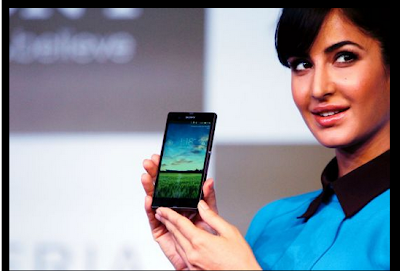
I was browsing through net today and saw a pic of Katrina kaif Holding a Smartphone and trust me both of them were looking awesome.Today Sony officially launched its latest Smartphone and Tablet Xperia Z  in India at Rs 38,990.The smartphone, referred to as the world's first superphone, was launched by newly appointed brand ambassador Katrina Kaif. 


                                     Credits:indiatimes

Talking about its features it has a 5-inch 1080 display and runs on Android 4.1 Jelly Bean. It uses BRAVIA 2 Engine for providing users with excellent picture quality. It has a powerful 1.5 GHz Quad-Core Qualcomm processor with Adreno 320 GPU with massive 2 GB RAM and is just 7.9 mm thin. It has a 13 MP camera which uses an EXMOR R2 Sensor with an LED flash and a 2MP secondary camera. It comes with an default 16 GB internal memory which can be boosted up with an available microSD card slot. This massive beast is powered by a 2330 mAh battery.


That's not it!! Now comes the most awesome feature about this phone.. it's dust & water resistant with an IP55 and IP57 rating. 
Sony has also come up with an "One Touch System", which allows you to share stuffs on the device with other Sony devices such speakers and TVs. As expected, there is also a PlayStation Mobile support.

via-indiaexpress

You can also like us on Facebook or follow us on Twitter.

Wednesday, March 06, 2013

Notification Popup Alert Provides Notification Anytime,Anywhere For Android


Have you ever been caught in situation where you are busy enjoying your app and you get notification maybe Texts or Watsapp and you have to go back to the screen to find the notification was useless or worth no reply. Well it does create more pain when playing games like Zynga Poker you receive a notification and you have to switch back to your home screen and until you find it was waste, you go back to the Game and find yourself connecting. Ultimately, it takes some time for nothing such useful you do for that period.

When you have Android you don't have to worry about such Notifications preview apps as we find some of the good tested one here for you. 


Notification Popup Alert developed by a XDA Forum member TraberSoftware which promises to solve your such miseries. Currently in beta stage but the app has wider functionalists. So after installing it on your phone you could receive a popup message of notification on bottom of your screen which vanishes with your touch. Not only it notifies with your all phone's activities but also you can select whichever app notification you need. So in-case you need Whatsapp and Viber notifications that can be done in the settings. 


For so far we have tested the app works efficiently but as it's in beta mode it can have few bugs. 


After you install the app make sure you enable the status of the app from the settings. You can even customize the Pop-up style to two different shades consisting of Light and Dark. 


As you can see from above screenshot it can help you to clearly see what notification you are getting so you don't end wasting time switching screen.

Get Notification Popup Alert for free - Play Store Link.
Download the apk- here

You can also like us on Facebook or follow us on Twitter.

Do let us know about this app in the comment section below.

Sunday, March 03, 2013

Samsung Galaxy S IV : Confirmed Features

Samsung Galaxy S IV Event is just around the corner and we all are really excited to see what Samsung has to offer this time. Meanwhile, Android Advices recently uploaded some of the confirmed features of Samsung Galaxy S IV which are quiet a catch.


       Two Camera’s work (Front and Rear) simultaneously for 360 capture. 
       

       Smart Scroll
 

       Qualcomm Processor
       

       Air View Touch
 

       Updated Gallery with new features for Grouping of Photos


Among all, odd one is the use of Qulacomm Processor in Galaxy S IV. Other than that, the 360 deg capture looks really eye-catching. What it does is it uses both the front and the back camera and takes an 360 deg image. (wow!)

The Gallery in the Samung Galaxy S IV will also be upadted with new UI and features which involoves a new method for grouping of pictures.


Smart Scroll is something which we have no idea about but its surely related to sensor which might capture your head movement and accordingly scroll the page.(Just a guess!)


Rumors are also that Samsung Galaxy S IV may feature a 'flexible display' and might be available in variety of colors rather than just two.

All our doubts will be cleared on 14th March and as usual Stay Tuned to Hackinthus as we will be covering the Entire Event.

(via - Android Advices)


You can also like us on Facebook or follow us on Twitter.


About Author :
Sukesh Kumar is long time iOS user who currently shifted to Android. He is currently pursuing his Engineering in Bangalore as a computer science student. His love towards his gadgets and experimenting with it's features brought him close towards blogging and writing about technical stuffs. Read More


BlackBerry Z10 Review

Finally the wait is over,Here is one of the most awaited phone of this year, Blackberry Z10. BlackBerry Z10 is BB's first smartphone based on the brand new BlackBerry 10 platform.This phone has been in rumors for quite a while and people were expecting it to compete with Android and iOS .BlackBerry Z10 hold its own against top-notch rivals like Apple iPhone 5, Samsung Galaxy Note II, Nokia Lumia 920, HTC Butterfly and Sony Xperia Z. But can BB Z10 make its way to the top and regain it's lost reputation?? Lets See.
It has launched in India with a price tag of ₹43,490.


Build Quality


Trust me, when you look at this phone for the first time it will blow your mind. Smooth curves, extreme sleek design,It looks something like combo of iPhone5 and HTC one.  The front has a big bezel on top as well as bottom of the touchscreen, which adds to its height a bit. Just above the display lie the earpiece, the front camera and the status LED. The Power button is still holding its position on the top (like other BB devices) and the 3.5mm audio jack alongside. The left edge has the Micro-USD and microHDMI ports and the right side has the volume rocker with the mute button nestled in between. 


Screen


BlackBerry Z10 comes with Capacitive touchscreen, 16M colors with a 4.2-inch 1280x768 display (355 ppi) that grows on you as you use the phone.The display is not the brightest we have seen though Visibility was impressive under the Sun.


Specifications


BlackBerry Z10 is powered by 1.5GHz dual-core processor, coupled with 2GB RAM, while the graphics are handled by the Adreno 225 GPU. Battery life is merely average,not so great.The phone comes with 16GB onboard storage and supports microSD cards up to 64GB.

Camera

On the back of BlackBerry Z10 is an 8-megapixel camera, capable of taking 1080p stabilized video.The Image quality is good but not comparable to that of iPhone 5 or Lumia 920. You can record either 720p or 1080p video, though you can't click a picture while shooting a video.The 2-megapixel front camera also offers 720p video capture that comes in pretty hand with video over BBM.


Software


Everyone was quite excited about the BB10 OS.There were several rumors and alpha devices suggesting different things about the OS but lets see How it actually is ?


The new OS brings a new twist to a tried-and-tested interface of BlackBerry phones and does a good job as there is only a small learning curves .Yes, there are a few bugs that crop up once in a while, but nothing major.The most important gesture, however, is swiping up and to the right. This exposes the BlackBerry Hub, which aggregates all your forms of connectivity into a single, overpowering list. In BlackBerry 10, you get a home screen that doubles up as the app menu, task switcher.
However, for anyone else looking for a smartphone that lets them browse the Internet, use emails, Facebook and Twitter, click the occasional picture, as well as do a bit of casual gaming, BlackBerry 10 is definitely worth a second look. 


Connectivity

It has quite the features that is packed in every other device.It supports GPRS adnd Edge.It has a speed of HSDPA 21 Mbps, HSUPA 5.76 Mbps; LTE, EV-DO Rev. A, up to 3.1 Mbps.WLAN Wi-Fi 802.11 a/b/g/n, dual band Bluetooth v4.0 with A2DP, LE,And ofcourse NFC.Those are all paired with 802.11a/b/g/n and Bluetooth 4.0, while the phone also offers accelerometer, gyro, magnetometer and GPS.


So, What do guys think? Time for Blackberry Boys to come back in action and show what it really is to own a Blackberry!! 
Do comment and let us know what you feel. 


You can also like us on Facebook or follow us on Twitter.


About Author


Harkirat Singh is a final year Engineering Student who is crazy about gadgets and food. He has been using Symbian for a very long time. He is a gizmoteer and likes trying different brands and operating systems. He believes in simplicity and leads his life in the same way. Read More


Saturday, March 02, 2013

How To Install Jelly Bean 4.1.2 In Samsung Galaxy Note GT N 7000


Samsung has launched Jelly Bean Android Version 4.1.2 in various parts of world. They have a habit of rolling updates in one region and then passing over the whole world. There is nothing such as world wide release which Apple does.

Now what do other user do to get the Firmware which is released for other countries? Simply waiting for the same thing which you are about to get from your Kies or directly is useless. I am when we can assure you that nothing happens to your phone it's the same but only you have to do it manually.

So if you have Samsung Galaxy GT N 7000 and you are willing to get yourself the Jelly bean 4.1.2 update it's easy and carefully follow the instructions below.

Download the Firmware of Jelly Bean 4.1.2 from here. It links you to the website for Samsung Updates of various firmwares. Select the first one from Germany and download it. Or download it from here (Hong Kong, Taiwan) gives you the direct link.

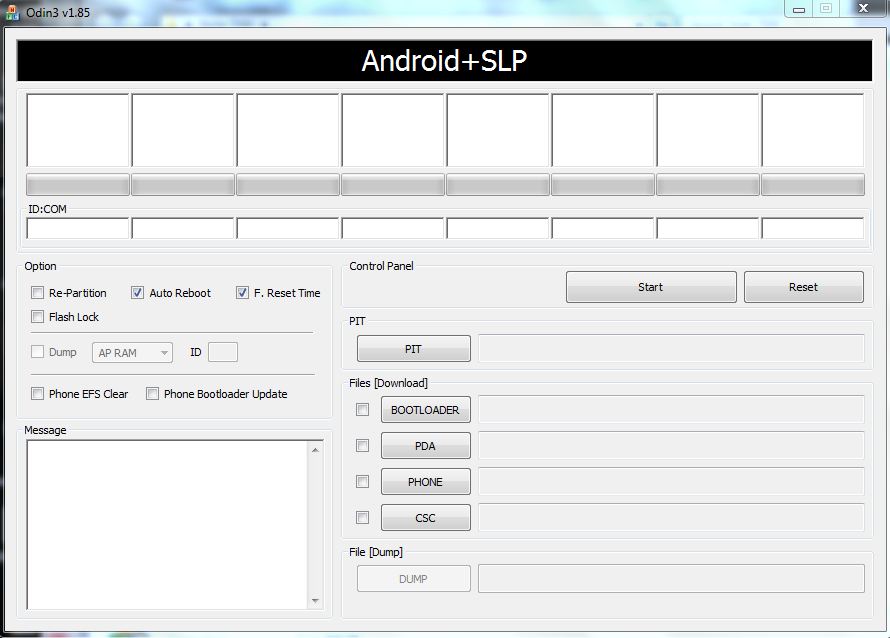
Secondly you will need Odin v1.85 and extract the file.

To go ahead with the process after you have downloaded the file make sure you have Samsung Kies installed on your PC otherwise there could be problem recognizing the drivers. 

Enable Phone's USB debugging mode from your phone's settings and make sure your phone is fully charged. It is recommended to make a proper backup of your phone's data as during any issue your phone is recovered. 

Launch Odin now and run it in Administrator mode-


Click To Zoom

Power off Galaxy Note and put it on the Download Mode. To do this, press and hold the Volume Down and Home buttons while pressing the Power button until the Samsung Galaxy logo appears on the screen.

Connect the phone in download mode with your USB connected to PC running Odin.

Now click on PDA and browse the ".md5" file you have downloaded above. Make sure the Auto Reboot and F.Reset Time is set. 


Click To Zoom
You are ready to go now, hot the start button and wait for the process to complete itself. After the process is done Samsung logo will pop up and it will take few more minutes to load. However your data wont be lost. In case you had previously rooted before installing this your root will vanish. 


Some of the key features of the Android 4.1.2 Jelly Bean update (Build JZO54K) for Samsung Galaxy Note (GT-N7000) include:

- Smooth performance and stability

- Multi-View (Multi Windows Multitasking, same as in Note 2)

- Multi-View can also be disabled

- Page Buddy

- Customizable Notification Panel

- New additions in Notification Panel

- Smart Rotation

- Samsung’s S Cloud services

- Features like Direct Call, Smart Stay and Pop-up Play

- New widgets from the Galaxy S3

- Two Home screen modes

- New Notifications bar

- Google Now

You can also like us on Facebook or follow us on Twitter.

Overall it's perfect until you overload your RAM.

Got any doubt make sure to ask us in the comment section.

Share

Twitter Delicious Facebook Digg Stumbleupon Favorites More